 博客详情
博客详情
springboot中使用druid的SQL监控 (原创)
作者: 朝如青丝暮成雪
发布时间:2020-09-03 18:26:30 文章分类:springboot 阅读(1701) 评论(0)
发布时间:2020-09-03 18:26:30 文章分类:springboot 阅读(1701) 评论(0)
springboot中集成druid,并开启sql监控、web url请求监控功能
1、pom.xml配置
 <!-- jdbc starter引入 -->
    <dependency>
      <groupId>org.springframework.boot</groupId>
      <artifactId>spring-boot-starter-jdbc</artifactId>
    </dependency>
    <!-- jdbc mysql驱动 -->
    <dependency>
      <groupId>mysql</groupId>
      <artifactId>mysql-connector-java</artifactId>
    </dependency>

    <!-- 引入druid连接池  -->
    <dependency>
      <groupId>com.alibaba</groupId>
      <artifactId>druid</artifactId>
      <version>1.1.10</version>
    </dependency>
    <dependency>
      <groupId>com.alibaba</groupId>
      <artifactId>druid-spring-boot-starter</artifactId>
      <version>1.1.10</version>
    </dependency>

    <!--引入mybatis-plus  starter依赖  -->
    <dependency>
      <groupId>com.baomidou</groupId>
      <artifactId>mybatis-plus-boot-starter</artifactId>
      <version>3.0.6</version>
    </dependency>
2、application.yml配置
spring:
  jackson:
    date-format: yyyy-MM-dd HH:mm:ss
    time-zone: GMT+8

  #druid连接池
  datasource:
    druid:
      driver-class-name: com.mysql.cj.jdbc.Driver
      username: root
      password: 123456
      url: jdbc:mysql://localhost:3306/rocketdemo?useUnicode=true&characterEncoding=utf-8&useSSL=false&serverTimezone=GMT%2B8
      initial-size: 5 #初始化连接数
      max-active: 10  #最大活跃连接数
      min-idle: 5 #最小空闲连接数
      max-wait: 60000 #最大连接等待时间 毫秒
      remove-abandoned: true #超过时间限制是否回收
      removeAbandonedTimeout: 1800 #超时丢弃连接 1800秒即30分钟
      timeBetweenEvictionRunsMillis: 60000 #配置时间间隔进行一次检测,毫秒
      validationQuery: SELECT 1 FROM DUAL #用来检测连接是否有效的sql,要求是一个查询语句
      testWhileIdle: true  #申请连接的时候检测
      testOnBorrow: false
      testOnReturn: false
      poolPreparedStatements: true #打开PSCache,并且指定每个连接上PSCache的大小
      maxPoolPreparedStatementPerConnectionSize: 20
      maxOpenPreparedStatements: 20

      #web url请求监控
      web-stat-filter:
        enabled: true
        exclusions: "*.js,*.gif,*.jpg,*.png,*.css,*.ico,/druid/*"
      #sql执行监控
      stat-view-servlet:
        enabled: true
        login-username: druid
        login-password: druid2020
        #reset-enable: false
        #allow: "127.0.0.1" #IP白名单  多个ip以逗号隔开
        #deny:   #IP黑名单 (存在共同时,则deny优先于allow)
3、 启动springboot程序,浏览器访问 http://localhost:8082/druid/
登录用户/密码 : druid / druid2020
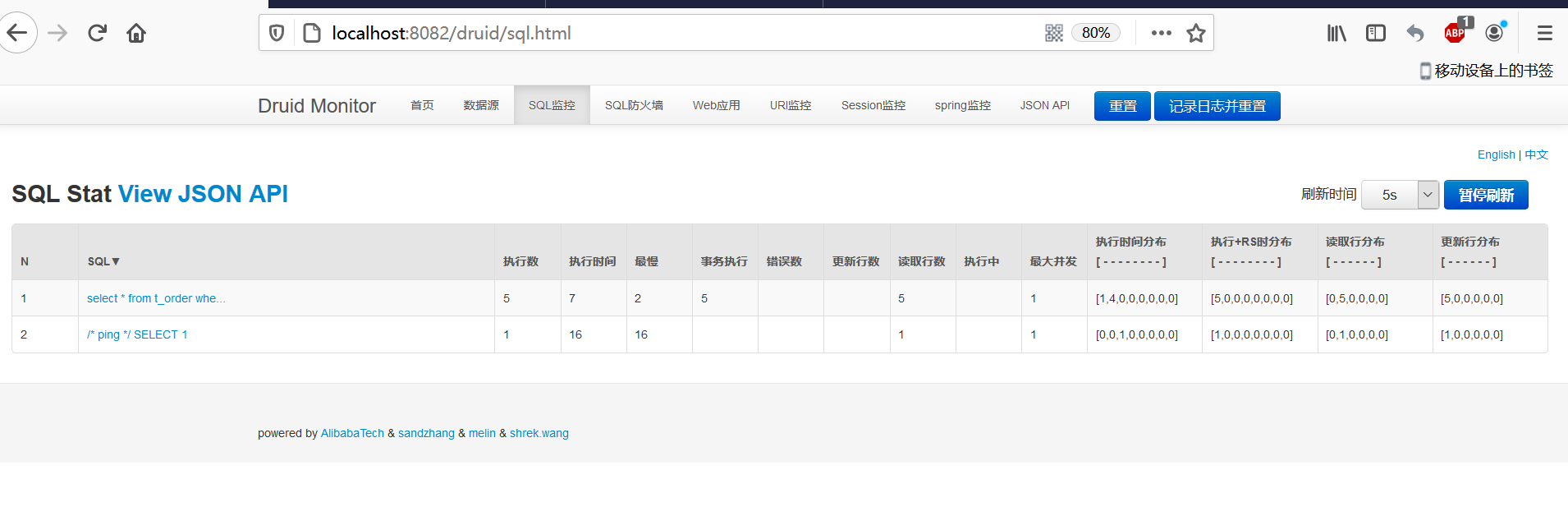
SQL 语句执行监控:
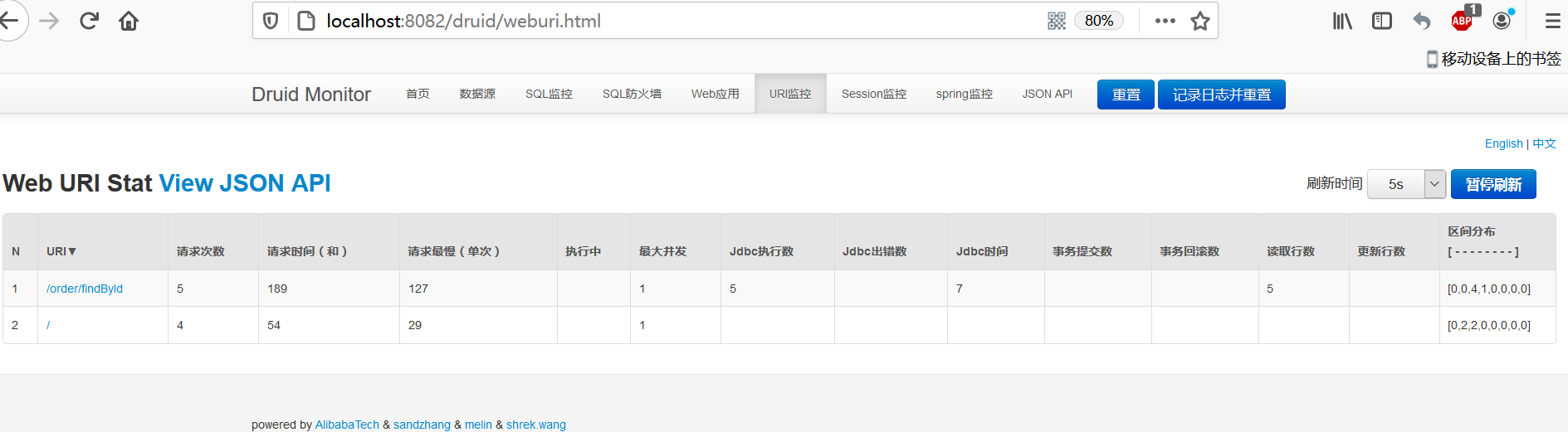
Web URL 请求监控:
关键的配置信息为:
#web url请求监控
web-stat-filter:
enabled: true
exclusions: "*.js,*.gif,*.jpg,*.png,*.css,*.ico,/druid/*"
#sql执行监控
stat-view-servlet:
enabled: true
login-username: druid
login-password: druid2020
#reset-enable: false
#allow: "127.0.0.1" #IP白名单 多个ip以逗号隔开
#deny: #IP黑名单 (存在共同时,则deny优先于allow)
 评论信息
评论信息
暂无评论
 发表评论
发表评论
 博主信息
博主信息

数据加载中,请稍候...
 文章分类
文章分类
数据加载中,请稍候...
 阅读排行
阅读排行
数据加载中,请稍候...
评论排行
数据加载中,请稍候...
