 博客详情
博客详情
springcloud(十一)--服务链路追踪Spring Cloud Sleuth (原创)
发布时间:2018-08-25 13:57:20 文章分类:springcloud 阅读(1254) 评论(0)
如题,本篇我们介绍下服务链路追踪Spring Cloud Sleuth 。
关于Sleuth的一些术语 ,参见github官网 https://github.com/spring-cloud/spring-cloud-sleuth
Span:基本工作单元,例如,在一个新建的span中发送一个RPC等同于发送一个回应请求给RPC,span通过一个64位ID唯一标识,trace以另一个64位ID表示,span还有其他数据信息,比如摘要、时间戳事件、关键值注释(tags)、span的ID、以及进度ID(通常是IP地址)
span在不断的启动和停止,同时记录了时间信息,当你创建了一个span,你必须在未来的某个时刻停止它。
Trace:一系列spans组成的一个树状结构,例如,如果你正在跑一个分布式大数据工程,你可能需要创建一个trace。
Annotation:用来及时记录一个事件的存在,一些核心annotations用来定义一个请求的开始和结束
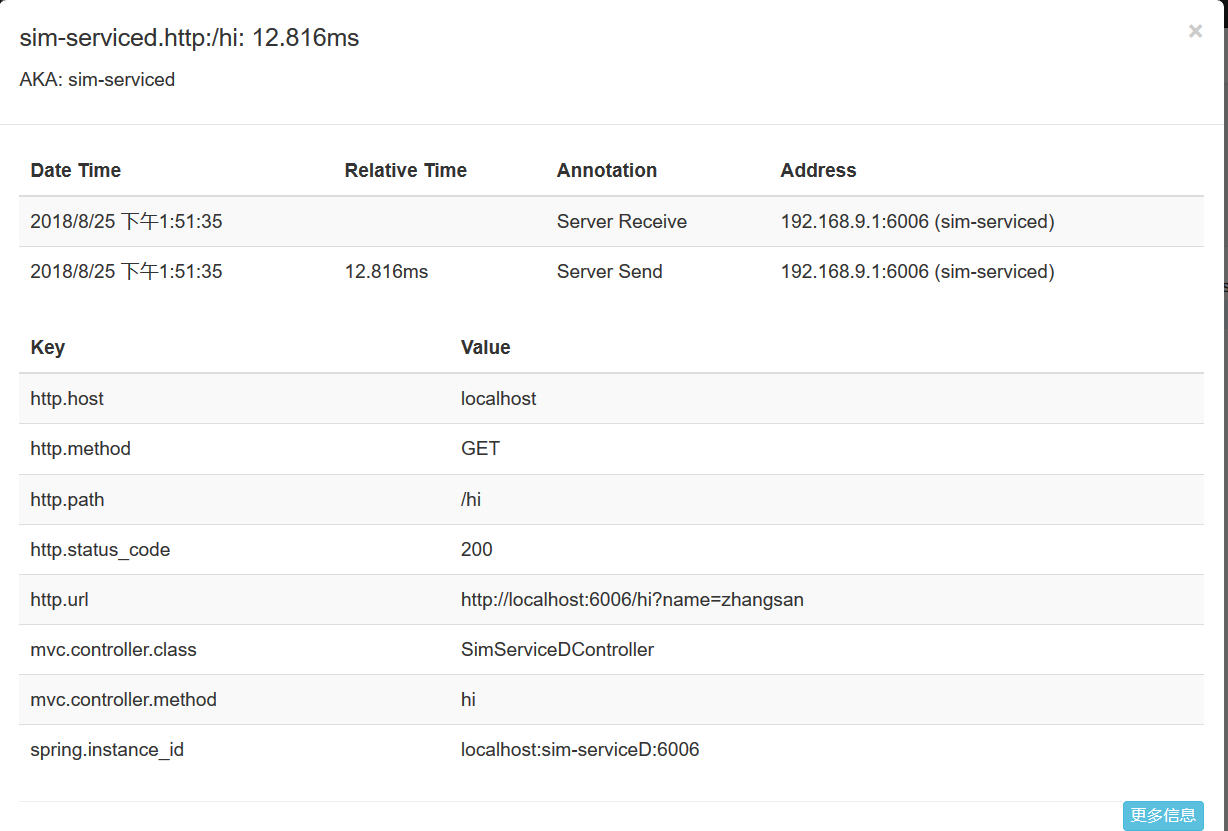
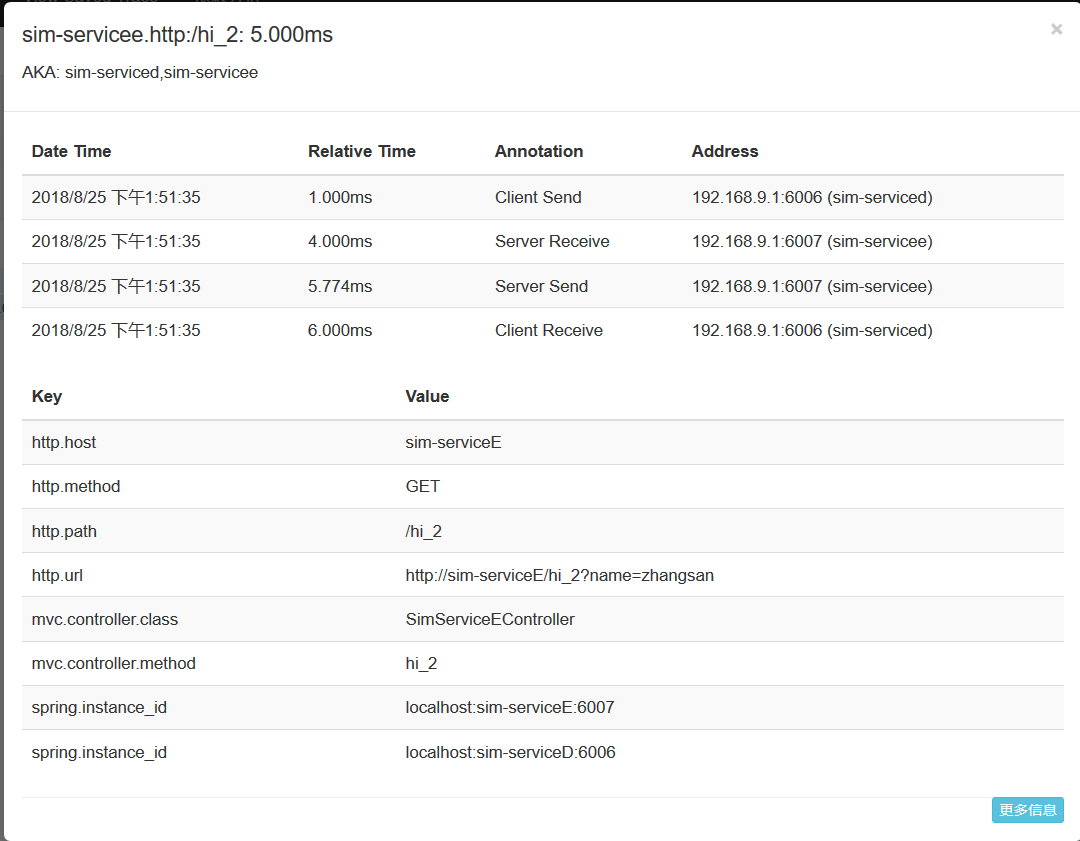
cs - Client Sent -客户端发起一个请求,这个annotion描述了这个span的开始
sr - Server Received -服务端获得请求并准备开始处理它,如果将其sr减去cs时间戳便可得到网络延迟
ss - Server Sent -注解表明请求处理的完成(当请求返回客户端),如果ss减去sr时间戳便可得到服务端需要的处理请求时间
cr - Client Received -表明span的结束,客户端成功接收到服务端的回复,如果cr减去cs时间戳便可得到客户端从服务端获取回复的所有所需时间
将Span和Trace在一个系统中使用Zipkin注解的过程图形化:
搭建 sim-zipkinServer 服务工程
1、pom.xml中引入
 <dependency>
            <groupId>org.springframework.cloud</groupId>
            <artifactId>spring-cloud-starter-eureka</artifactId>
        </dependency>

       <dependency>
           <groupId>org.springframework.boot</groupId>
           <artifactId>spring-boot-starter-web</artifactId>
       </dependency>
       <dependency>
           <groupId>org.springframework.boot</groupId>
           <artifactId>spring-boot-starter-test</artifactId>
           <scope>test</scope>
       </dependency>

        <dependency>
            <groupId>io.zipkin.java</groupId>
            <artifactId>zipkin-server</artifactId>
        </dependency>

        <dependency>
            <groupId>io.zipkin.java</groupId>
            <artifactId>zipkin-autoconfigure-ui</artifactId>
        </dependency>
2、 application.yml配置
server:
  port: 9411

spring:
  application:
    name: sim-zipkinServer

eureka:
  instance:
    hostname: localhost
    prefer-ip-address: true
  client:
    service-url:
      defaultZone: http://localhost:8761/eureka
3、springboot启动类
package com.tingcream.simZipkinServer;

import org.springframework.boot.SpringApplication;
import org.springframework.boot.autoconfigure.SpringBootApplication;
import org.springframework.cloud.netflix.eureka.EnableEurekaClient;
//import zipkin.server.EnableZipkinServer;//已过时
import zipkin.server.internal.EnableZipkinServer;

@SpringBootApplication
@EnableZipkinServer
@EnableEurekaClient
public class ZipKinServerApp {
	public static void main(String[] args) {
		SpringApplication.run(ZipKinServerApp.class, args);
	}

}
搭建sim-serviceD、sim-serviceE工程,作为两个微服务工程,sim-serviceD调用sim-serviceE接口,调用数据发送至sim-zipkinServer 以便进行服务调用链路监控。
sim-serviceD工程
1、pom.xml中引入
        <dependency>
			<groupId>org.springframework.boot</groupId>
			<artifactId>spring-boot-starter-web</artifactId>
		</dependency>

		<dependency>
			<groupId>org.springframework.cloud</groupId>
			<artifactId>spring-cloud-starter-zipkin</artifactId>
		</dependency>

		<dependency>
			<groupId>org.springframework.boot</groupId>
			<artifactId>spring-boot-starter-test</artifactId>
			<scope>test</scope>
		</dependency>

        <dependency>
            <groupId>org.springframework.cloud</groupId>
            <artifactId>spring-cloud-starter-eureka</artifactId>
        </dependency>

        <!-- spring boot  devtools 开发者工具 -->
	   <dependency>
		    <groupId>org.springframework.boot</groupId>
		    <artifactId>spring-boot-devtools</artifactId>
		    <optional>true</optional>
	   </dependency>

	   <!-- ribbon 起步依赖 -->
		<dependency>
            <groupId>org.springframework.cloud</groupId>
            <artifactId>spring-cloud-starter-ribbon</artifactId>
        </dependency>
2、application.yml配置
server:
  port: 6006
  context-path: /


#devtool 热加载工具
spring:
  devtools:
    restart:
      enabled: true
      exclude: resources/**
#spring应用名称  、实例id配置
  application:
    name: sim-serviceD
  zipkin:
    #base-url: http://localhost:9411
    discovery-client-enabled: true
    base-url: http://sim-zipkinServer/
#spring.zipkin.base-url=http://localhost:9411

eureka:
  instance:
    hostname: localhost  #eureka客户端主机实例名称
    prefer-ip-address: true
  client:
    service-url:
      defaultZone: http://localhost:8761/eureka
3、springboot启动类
package com.tingcream.simServiceD;

import org.springframework.boot.SpringApplication;
import org.springframework.boot.autoconfigure.SpringBootApplication;
import org.springframework.cloud.client.discovery.EnableDiscoveryClient;
import org.springframework.cloud.client.loadbalancer.LoadBalanced;
import org.springframework.cloud.netflix.eureka.EnableEurekaClient;
import org.springframework.context.annotation.Bean;
import org.springframework.web.client.RestTemplate;


@SpringBootApplication
@EnableDiscoveryClient
@EnableEurekaClient  // 向注册中心注册服务
public class SimServiceDApp {

	public static void main(String[] args) {
		SpringApplication.run(SimServiceDApp.class, args);
	}


    @Bean
    @LoadBalanced
    RestTemplate restTemplate() {
	  return new RestTemplate();
    }
}
4、SimServiceDController.java
package com.tingcream.simServiceD.controller;

import org.springframework.beans.factory.annotation.Autowired;
import org.springframework.web.bind.annotation.GetMapping;
import org.springframework.web.bind.annotation.RestController;
import org.springframework.web.client.RestTemplate;

@RestController
public class SimServiceDController {

	private String  SIM_SERVICEE="http://sim-serviceE/";
	@Autowired
	private RestTemplate restTemplate  ;

	@GetMapping("/hi")
	public  String hi(String name) {
	   System.out.println("SimServiceDController  hi----------");
	   return   restTemplate.getForObject(SIM_SERVICEE+"/hi_2?name="+name, String.class);
	}

}
sim-serviceE工程
1、pom.xml中引入
 <dependency>
			<groupId>org.springframework.boot</groupId>
			<artifactId>spring-boot-starter-web</artifactId>
		</dependency>

		<dependency>
			<groupId>org.springframework.cloud</groupId>
			<artifactId>spring-cloud-starter-zipkin</artifactId>
		</dependency>

		<dependency>
			<groupId>org.springframework.boot</groupId>
			<artifactId>spring-boot-starter-test</artifactId>
			<scope>test</scope>
		</dependency>

        <dependency>
            <groupId>org.springframework.cloud</groupId>
            <artifactId>spring-cloud-starter-eureka</artifactId>
        </dependency>

        <!-- spring boot  devtools 开发者工具 -->
	   <dependency>
		    <groupId>org.springframework.boot</groupId>
		    <artifactId>spring-boot-devtools</artifactId>
		    <optional>true</optional>
	   </dependency>


         <!-- ribbon 起步依赖 -->
		<dependency>
            <groupId>org.springframework.cloud</groupId>
            <artifactId>spring-cloud-starter-ribbon</artifactId>
        </dependency>
2、application.yml配置
server:
  port: 6007
  context-path: /


#devtool 热加载工具
spring:
  devtools:
    restart:
      enabled: true
      exclude: resources/**
#spring应用名称  、实例id配置
  application:
    name: sim-serviceE
  zipkin:
    #base-url: http://localhost:9411
    discovery-client-enabled: true
    base-url: http://sim-zipkinServer/


#spring.zipkin.base-url=http://localhost:9411

eureka:
  instance:
    hostname: localhost  #eureka客户端主机实例名称
    prefer-ip-address: true
  client:
    service-url:
      defaultZone: http://localhost:8761/eureka
3、springboot启动类
package com.tingcream.simServiceE;

import org.springframework.boot.SpringApplication;
import org.springframework.boot.autoconfigure.SpringBootApplication;
import org.springframework.cloud.client.discovery.EnableDiscoveryClient;
import org.springframework.cloud.client.loadbalancer.LoadBalanced;
import org.springframework.cloud.netflix.eureka.EnableEurekaClient;
import org.springframework.context.annotation.Bean;
import org.springframework.web.client.RestTemplate;

@SpringBootApplication
@EnableDiscoveryClient
@EnableEurekaClient  // 向注册中心注册服务
public class SimServiceEApp {

	public static void main(String[] args) {
		SpringApplication.run(SimServiceEApp.class, args);
	}

	 @Bean
	 @LoadBalanced
    RestTemplate restTemplate() {
	  return new RestTemplate();
    }

}
4、SimServiceEController.java
package com.tingcream.simServiceE.controller;

import org.springframework.web.bind.annotation.GetMapping;
import org.springframework.web.bind.annotation.RestController;

@RestController
public class SimServiceEController {


	@GetMapping("/hi_2")
	public String hi_2(String name) {
		System.out.println("SimServiceEController  hi_2-------------");

		return "你好 "+name;
	}
}
分别启动sim-eureka、sim-zipkinServer、sim-serviceE 、sim-serviceD ,打开 http://localhost:9411链路监控页面
浏览器访问 http://localhost:6006/hi?name=zhangsan ,过一会后刷新 http://localhost:9411链路监控页面。
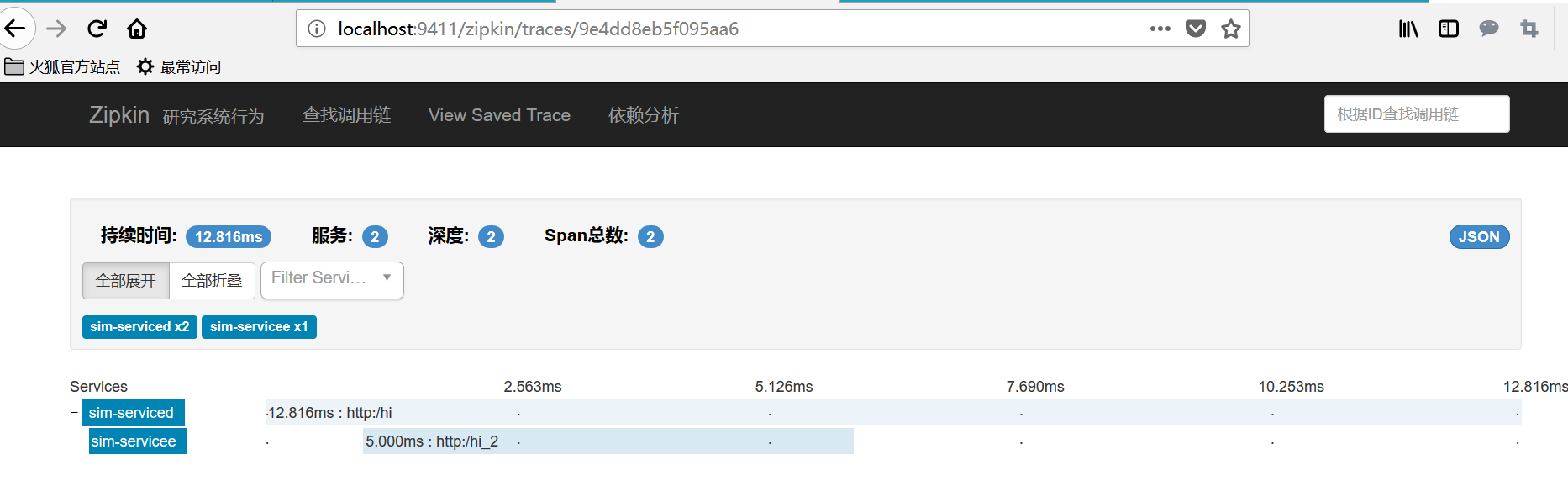
点击查看JSON详情 ,可观察到每次调用的详细时间戳信息。
 评论信息
评论信息
 发表评论
发表评论
 博主信息
博主信息

数据加载中,请稍候...
 文章分类
文章分类
数据加载中,请稍候...
 阅读排行
阅读排行
数据加载中,请稍候...
评论排行
数据加载中,请稍候...
