 博客详情
博客详情
springcloud(九)--分布式配置中心Spring Cloud Config (原创)
发布时间:2018-08-20 20:31:13 文章分类:springcloud 阅读(1338) 评论(0)
如题,本篇我们介绍下Spring Cloud 中分布式配置中心Spring Cloud config。
什么是SpringCloud Config配置中心?
在分布式系统中,每一个功能模块都能拆分成一个独立的服务,一次请求的完成,可能会调用很多个服务协调来完成,为了方便服务配置文件统一管理,更易于部署、维护,所以就需要分布式配置中心组件了,在spring cloud中,有分布式配置中心组件spring cloud config,它支持配置文件放在在配置服务的内存中,也支持放在远程Git仓库里。引入spring cloud config后,我们的外部配置文件就可以集中放置在一个git仓库里,再新建一个config server,用来管理所有的配置文件,维护的时候需要更改配置时,只需要在本地更改后,推送到远程仓库,所有的服务实例都可以通过config server来获取配置文件,这时每个服务实例就相当于配置服务的客户端config client,为了保证系统的稳定,配置服务端config server可以进行集群部署。
搭建config-server工程 sim-configServer :
1、pom.xml中引入
    <!-- config-server 起步依赖   -->
	    <dependency>
            <groupId>org.springframework.cloud</groupId>
            <artifactId>spring-cloud-config-server</artifactId>
        </dependency>

        <dependency>
            <groupId>org.springframework.cloud</groupId>
            <artifactId>spring-cloud-starter-eureka</artifactId>
        </dependency>

           <dependency>
            <groupId>org.springframework.boot</groupId>
            <artifactId>spring-boot-starter-test</artifactId>
            <scope>test</scope>
        </dependency>
2、application.yml 配置
server:
  port: 8888
  context-path: /


spring:
  application:
    name: sim-configServer
  #spring cloud config
  cloud:
    config:
      label: master
      server:
        git:
          uri:  https://gitee.com/mmxl/sim-git-config
         # searchPaths: repos
          username: mmxl
          password: xxxxxx


eureka:
  instance:
    hostname: localhost  #eureka客户端主机实例名称
    prefer-ip-address: true
  client:
    service-url:
      defaultZone: http://localhost:8761/eureka
3、springboot启动类上添加@EnableConfigServer、@EnableEurekaClient注解
package com.tingcream.simConfigServer;

import org.springframework.boot.SpringApplication;
import org.springframework.boot.autoconfigure.SpringBootApplication;
import org.springframework.cloud.config.server.EnableConfigServer;
import org.springframework.cloud.netflix.eureka.EnableEurekaClient;

@SpringBootApplication
@EnableConfigServer
@EnableEurekaClient
public class SimConfigServerApp {

	public static void main(String[] args) {
		SpringApplication.run(SimConfigServerApp.class, args);

	}
}
搭建config-client工程sim-serviceC :
1、pom.xml中引入
 <!-- config client 起步依赖  -->
        <dependency>
            <groupId>org.springframework.cloud</groupId>
            <artifactId>spring-cloud-starter-config</artifactId>
        </dependency>
        <dependency>
            <groupId>org.springframework.cloud</groupId>
            <artifactId>spring-cloud-starter-eureka</artifactId>
        </dependency>
         <dependency>
            <groupId>org.springframework.boot</groupId>
            <artifactId>spring-boot-starter-web</artifactId>
        </dependency>
        <dependency>
            <groupId>org.springframework.boot</groupId>
            <artifactId>spring-boot-starter-test</artifactId>
            <scope>test</scope>
        </dependency>
2、application.yml配置
server:
  port: 6004

spring:
  application:
    name: sim-serviceC
  profiles:
    active: #dev,test
      - dev
      - test


  cloud:
    config:
      label: master
      #profile: dev
      #uri:  http://localhost:8888/
      discovery:
        enabled: true
        serviceId: sim-configServer


eureka:
  instance:
    hostname: localhost  #eureka客户端主机实例名称
    prefer-ip-address: true
  client:
    service-url:
      defaultZone: http://localhost:8761/eureka
3、springboot启动类
package com.tingcream.simServiceC;
import org.springframework.boot.SpringApplication;
import org.springframework.boot.autoconfigure.SpringBootApplication;
import org.springframework.cloud.netflix.eureka.EnableEurekaClient;

@EnableEurekaClient
@SpringBootApplication
public class SimServiceCApp {

	public static void main(String[] args) {
        SpringApplication.run(SimServiceCApp.class, args);
    }

}
ServiceController.java
 package com.tingcream.simServiceC.controller;

import org.springframework.beans.factory.annotation.Value;
import org.springframework.web.bind.annotation.GetMapping;
import org.springframework.web.bind.annotation.RestController;


@RestController
public class ServiceCController {

	@Value("${app.msg}")
	private String appMsg ;

	@Value("${app.name}")
	private String appName ;

	@Value("${app.developer}")
	private String appDeveloper ;


	@GetMapping("/appMsg")
	public  String appMsg() {
		return  "apMsg ==== "+appMsg+",appName: "+appName+", appDeveloper: "+appDeveloper;
	}


}
依次启动sim-eureka 、sim-configServer 、sim-serviceC ,访问http://localhost:6004/appMsg
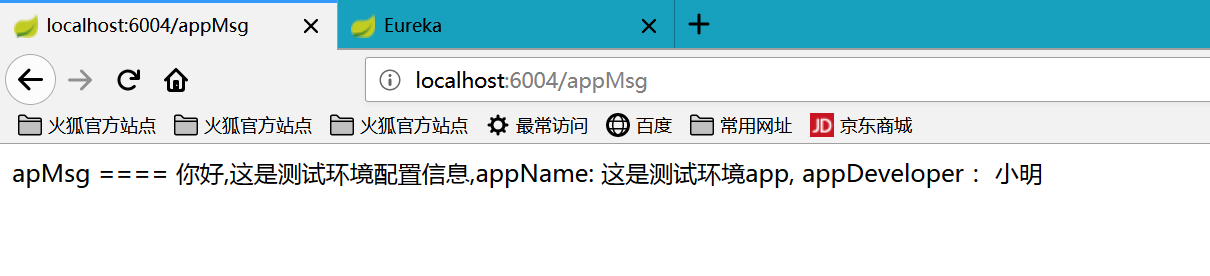
注:
1 、https://gitee.com/mmxl/sim-git-config ,这是笔者在码云上搭建的一个开源git仓库,用来存放整个sim项目的应用的配置文件。
2、 sim-serviceC工程中的 spring.profiles.active 配置的值可为一个字符串,或者字符串数组(集合)。当为数组(集合)时,可以配置为一行中间用逗号隔开,或者配置为 -开头的多个元素项
springcloud中如果同时激活了多个profile,则多个profile中配置的key/value 对最终会进行合并,如果多个profile中含有同名的key,则列表中后面的profile配置会覆盖前面的。
当然,如果不配置spring.profiles.active=dev,test,使用spring.cloud.config.profile=dev,test 也是可以的。
3 、sim-configServer中可访问的请求路径,如下:
/{application}/{profile}[/{label}]
/{application}-{profile}.yml
/{label}/{application}-{profile}.yml
/{application}-{profile}.properties
/{label}/{application}-{profile}.properties
4、 关于spring cloud config 的更多信息,可参照 http://projects.spring.io/spring-cloud/spring-cloud.html#_spring_cloud_config
 评论信息
评论信息
 发表评论
发表评论
 博主信息
博主信息

数据加载中,请稍候...
 文章分类
文章分类
数据加载中,请稍候...
 阅读排行
阅读排行
数据加载中,请稍候...
评论排行
数据加载中,请稍候...
